Every new browser tab opens a live cryptocurrency chart. Track what
you hold, read your country's crypto tax rules, practise with no real
money, and get told when a price you care about is hit — with no
permission asked at install.
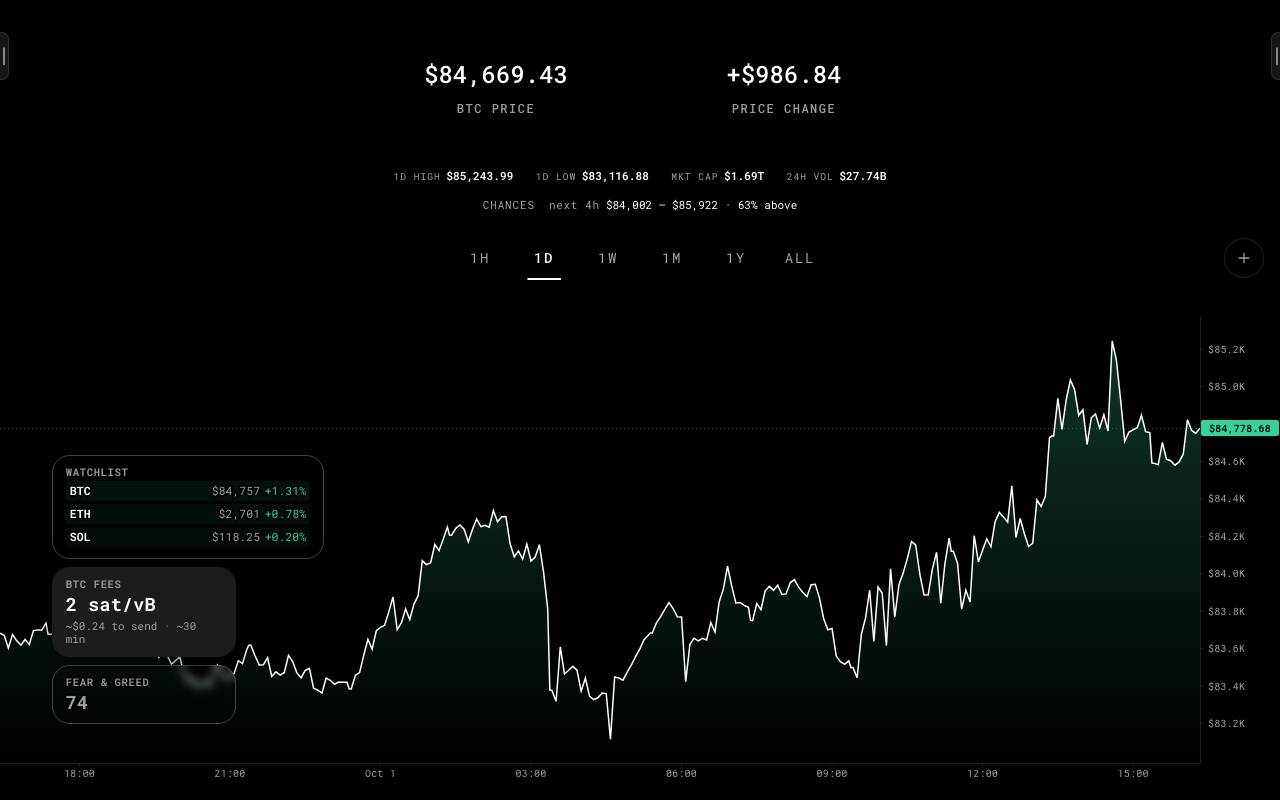
Line or candlesticks over six ranges, with a price scale and a time axis. Drag it any way — sideways through time, up and down through prices — scroll or pinch to zoom where you point, and finer candles load as you go in. A log axis, an average that says what it covers, US inflation releases marked where they fall, and every point readable from the keyboard.
Draw and measure
02
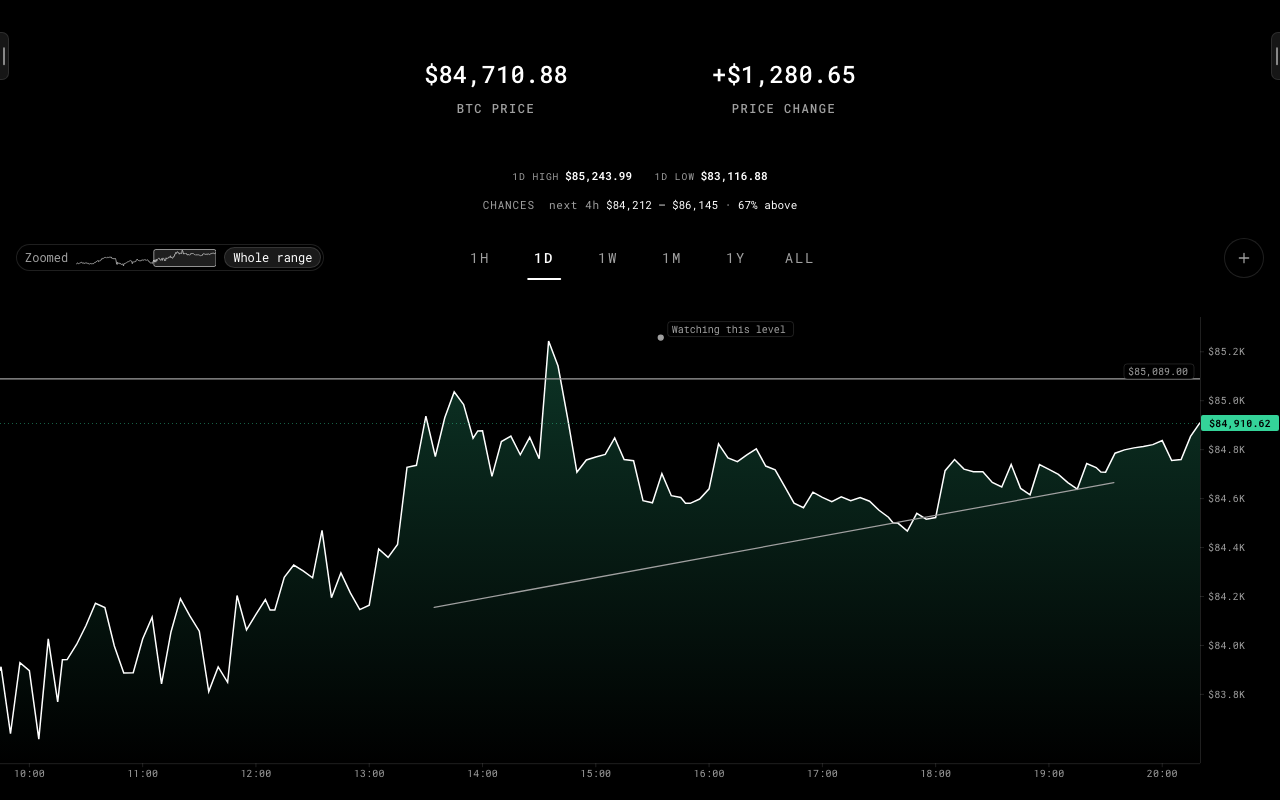
Lines, trend lines, rays, boxes and notes that stay with the coin at their price and time. A ruler that says the change, the time and how often a move that far happened in that long. A line can become a price target.
Counted studies
03
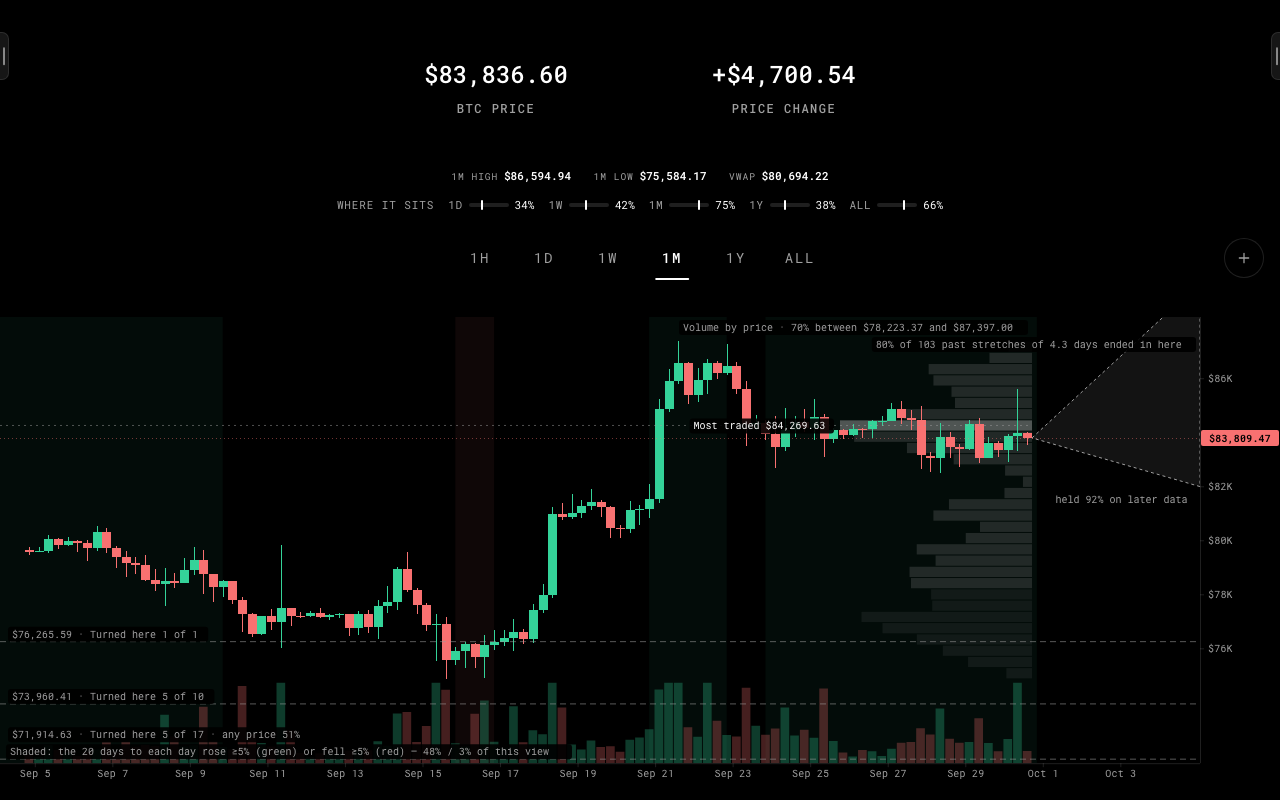
Volume by price, where the price sits in each range, the usual range ahead as a cone, regimes and the levels where it has turned. Each was tested on years of history first, and each says what it counts — never what comes next.
Compare with anything
04
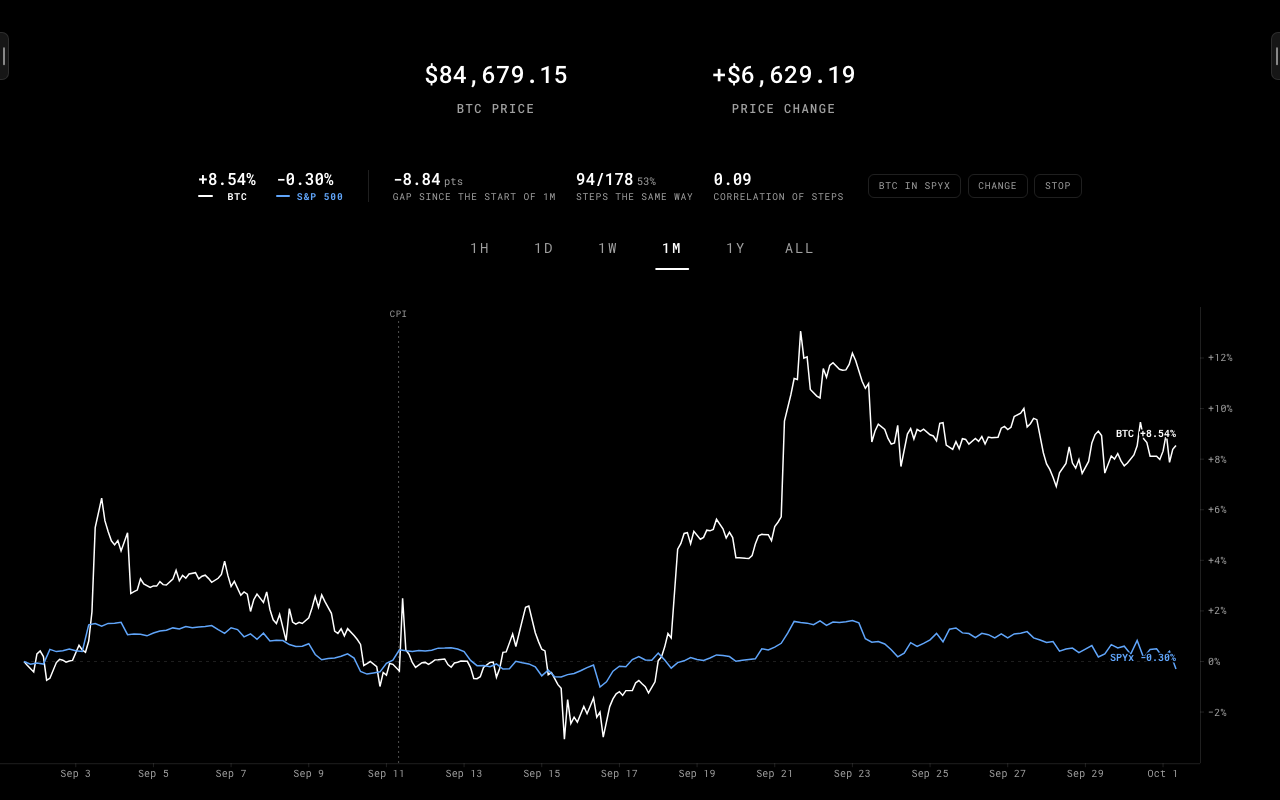
Another coin, the S&P 500, the Nasdaq 100 or gold, from a drawer beside the chart. Both drawn as percent change from the same moment on one shared axis, with the gap, how often they stepped the same way and how closely they moved — so where the lines cross is where the market put them.
Chart companion
05
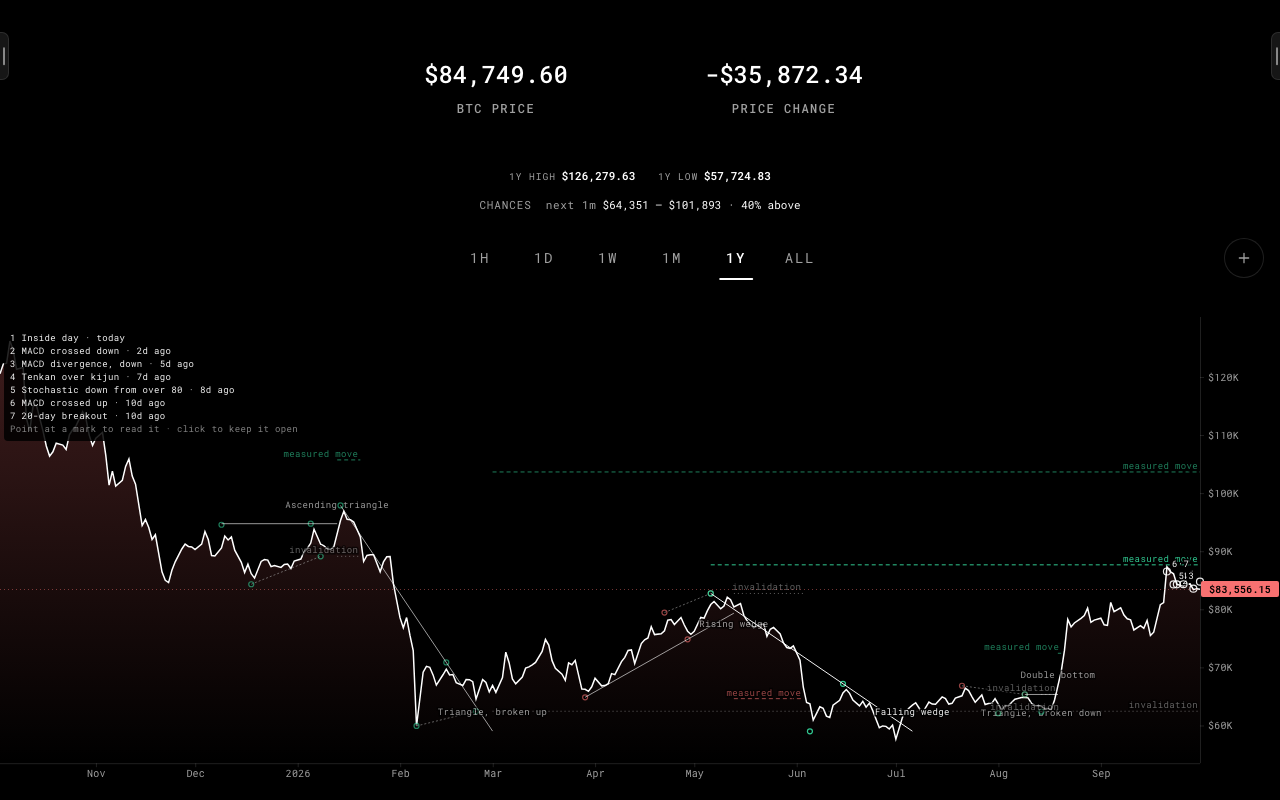
Sixteen chart patterns — head and shoulders, triangles, wedges, ranges, flags — twelve strategy setups and twenty-one readings such as divergences, the Ichimoku cloud and Fibonacci retracements, named where they appear. Each sits beside what followed it on this coin and how it did when tested on four coins. Counted, never scored.
Call the next move
06
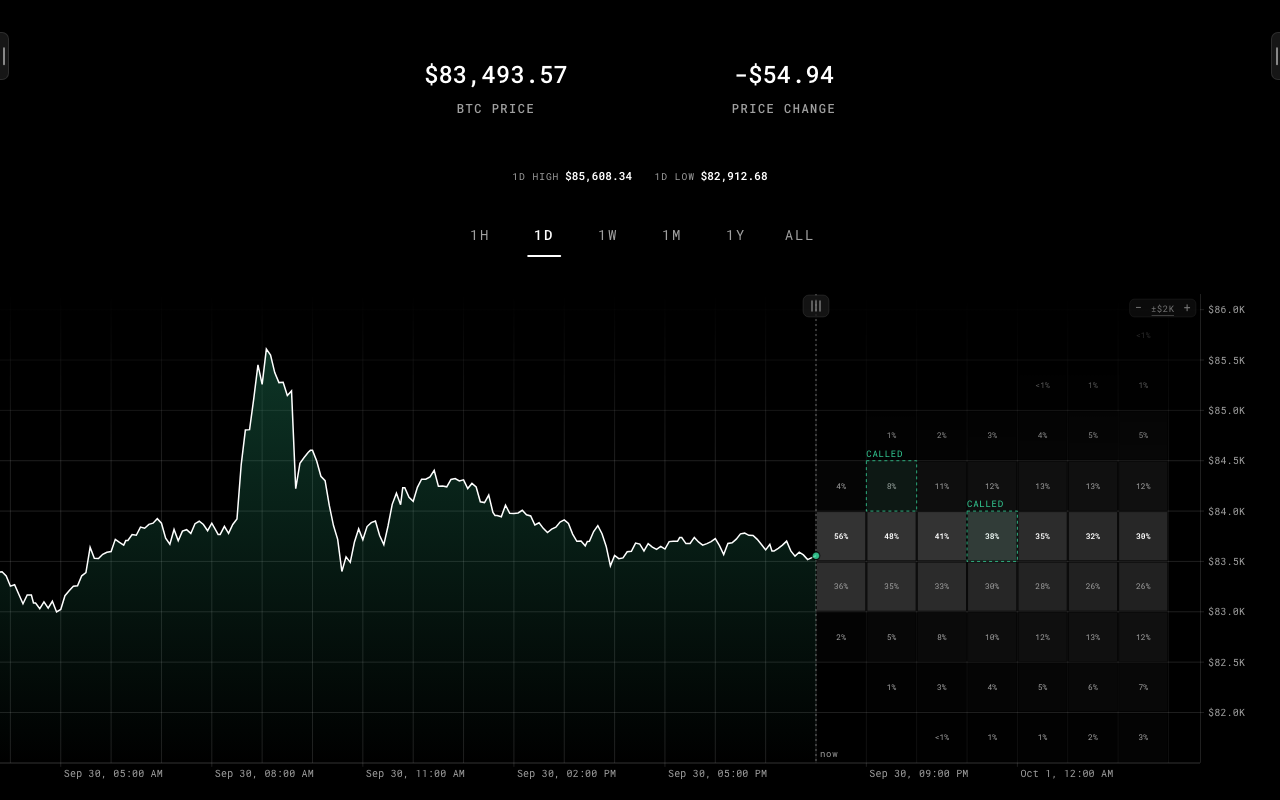
The right of the chart becomes a board of squares — real price bands at real moments ahead, each with its chance, worked out from the coin's own history and checked against years of past squares before it was allowed on. Drag the board to look further, click a square twice, and it settles itself: called it, or missed. The score is local, worth nothing, and never leaves.
Price targets
07
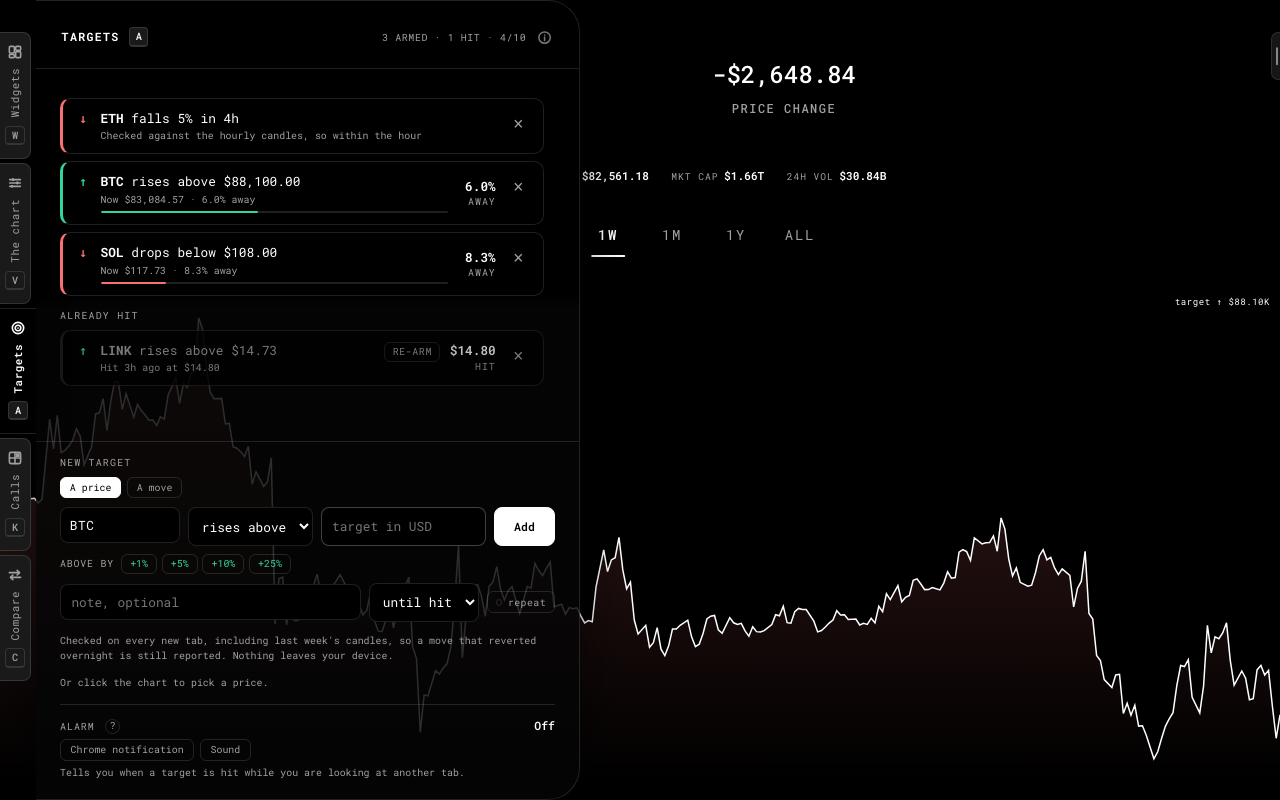
"BTC rises above 80,000", or "BTC falls 5% in 1h, 4h or 24h". Reported next time you open a tab — even a move that happened and reverted overnight — and, only if you switch it on, as a Chrome notification.
TARGET
Portfolio
08
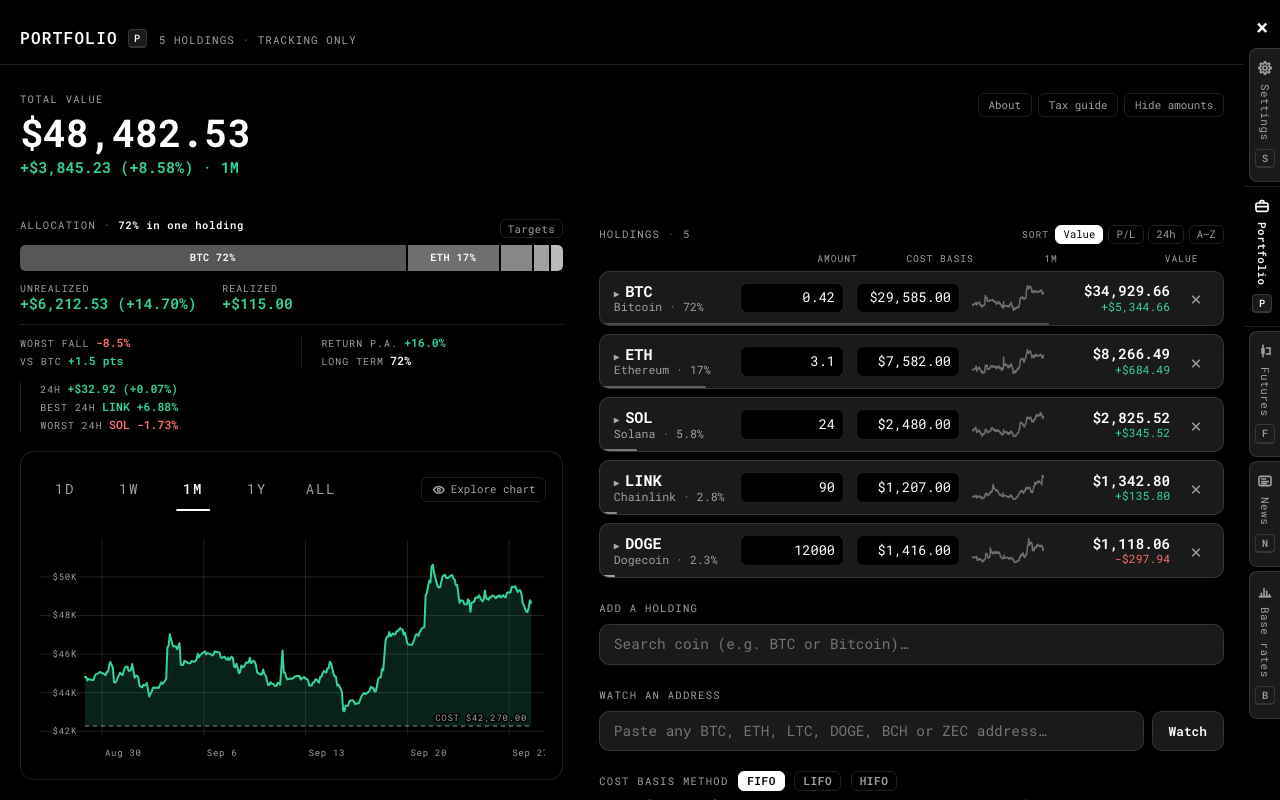
Holdings by amount, or a public address read for its balance. Dated purchases, sales and income; cost basis by FIFO, LIFO or HIFO; the return month by month. Press H and the amounts are masked.
Crypto tax guide
09
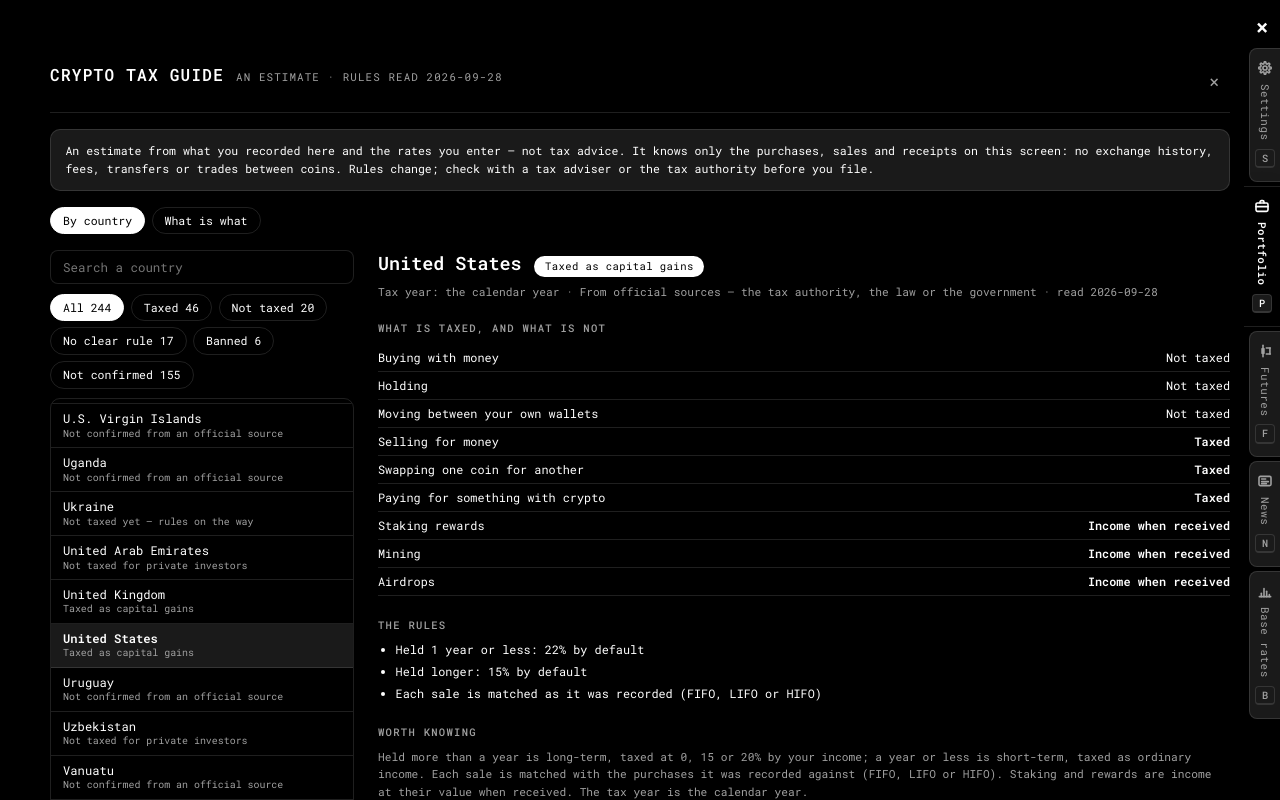
The crypto tax rules of 244 countries and territories — what is taxed and what is not, the rates, the tax year — each read from the country's own tax authority or law, linked and dated. Where none was confirmed, it says so. Not tax advice.
Practice derivatives
10
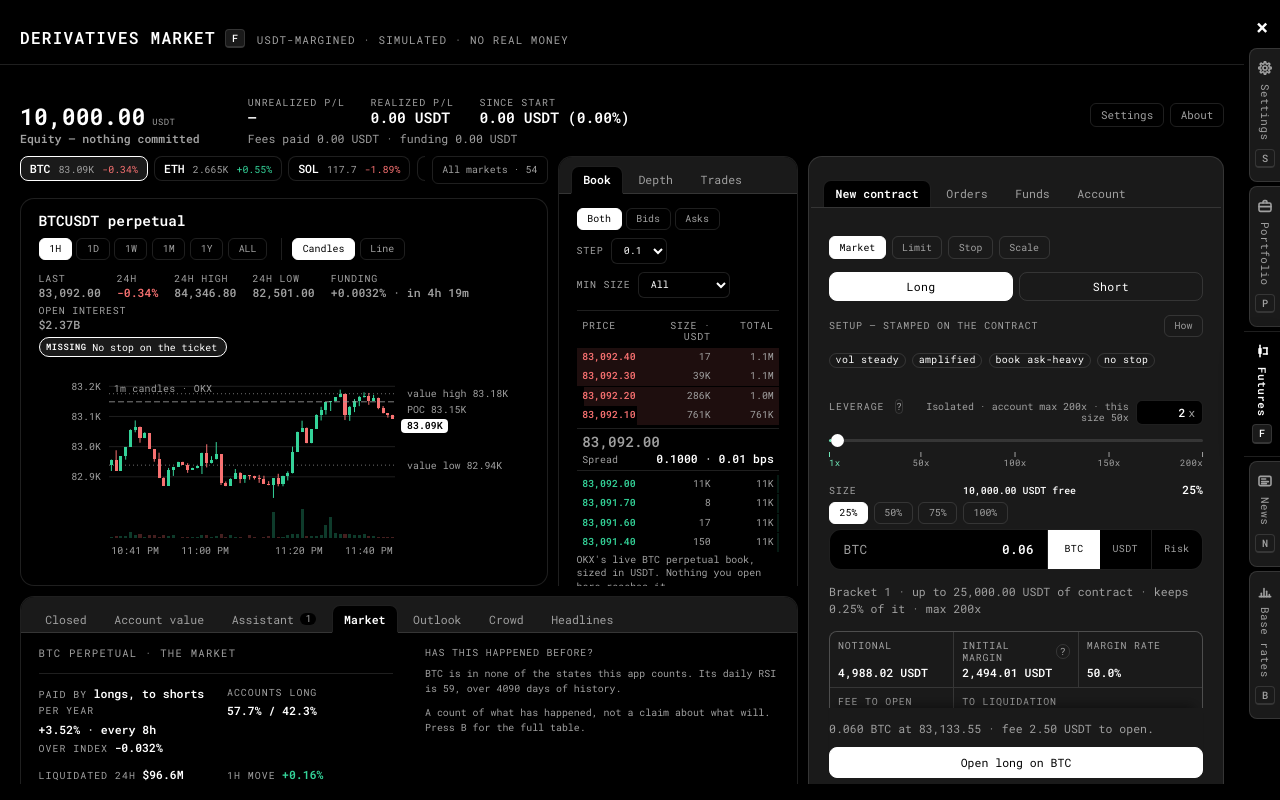
A perpetual-contract terminal priced from a real venue's public quotes: long or short up to 200x, stops, limit orders, funding and liquidation. Settled in Practice Units that cannot be bought or cashed out — no real money, ever.
News, dated and read
11
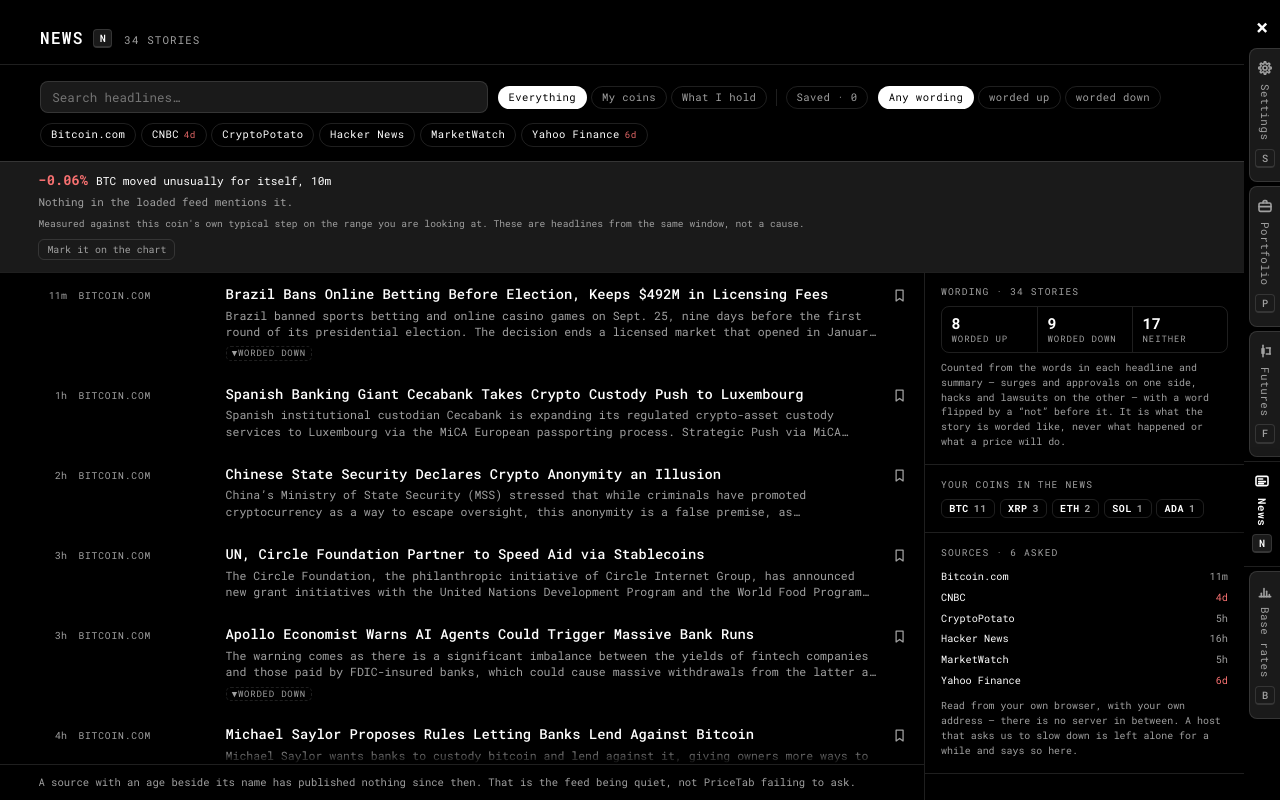
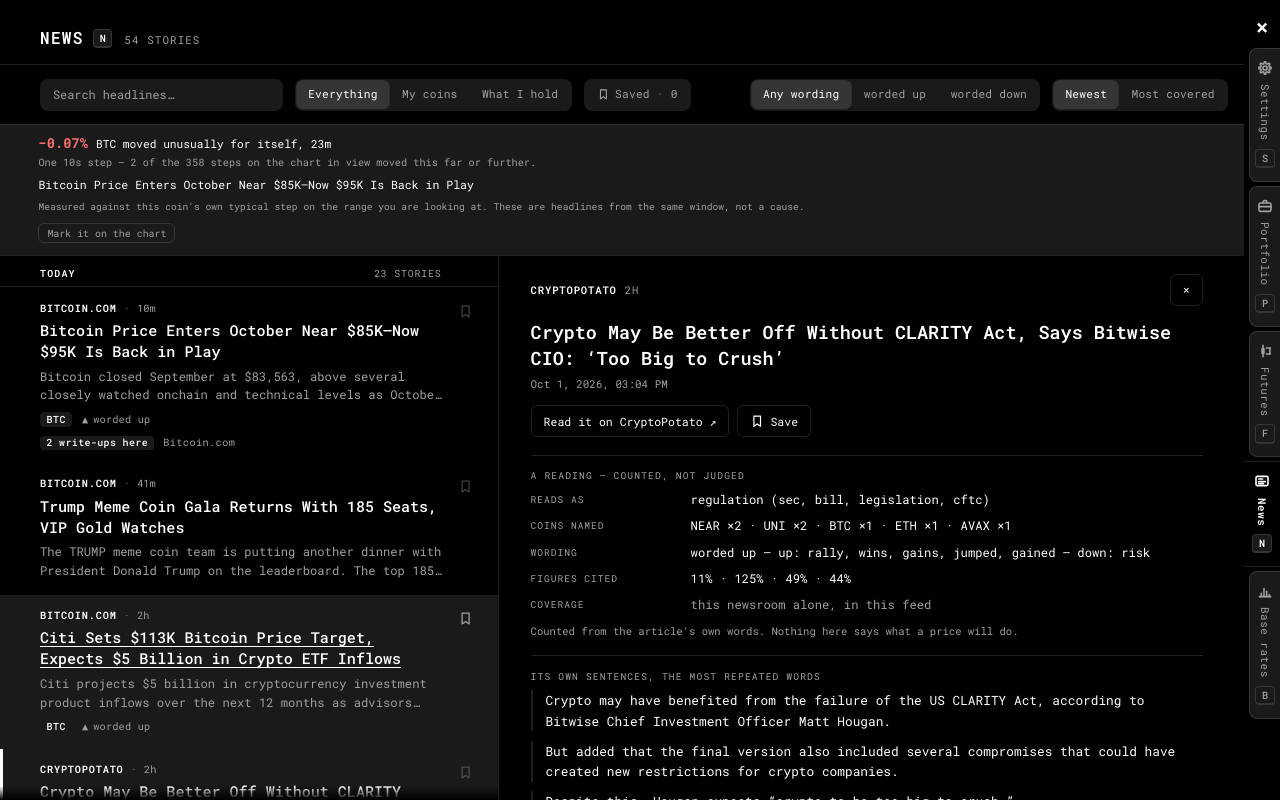
Fourteen sources, filtered to your coins or your holdings, with advertising kept out and one story written up four times shown once. Click a headline and the story opens beside the list without its pictures, with a reading of it: what kind of story its words make it, the coins and figures it names, and what the chart did since. Counted, never judged.
Has this happened before?
12
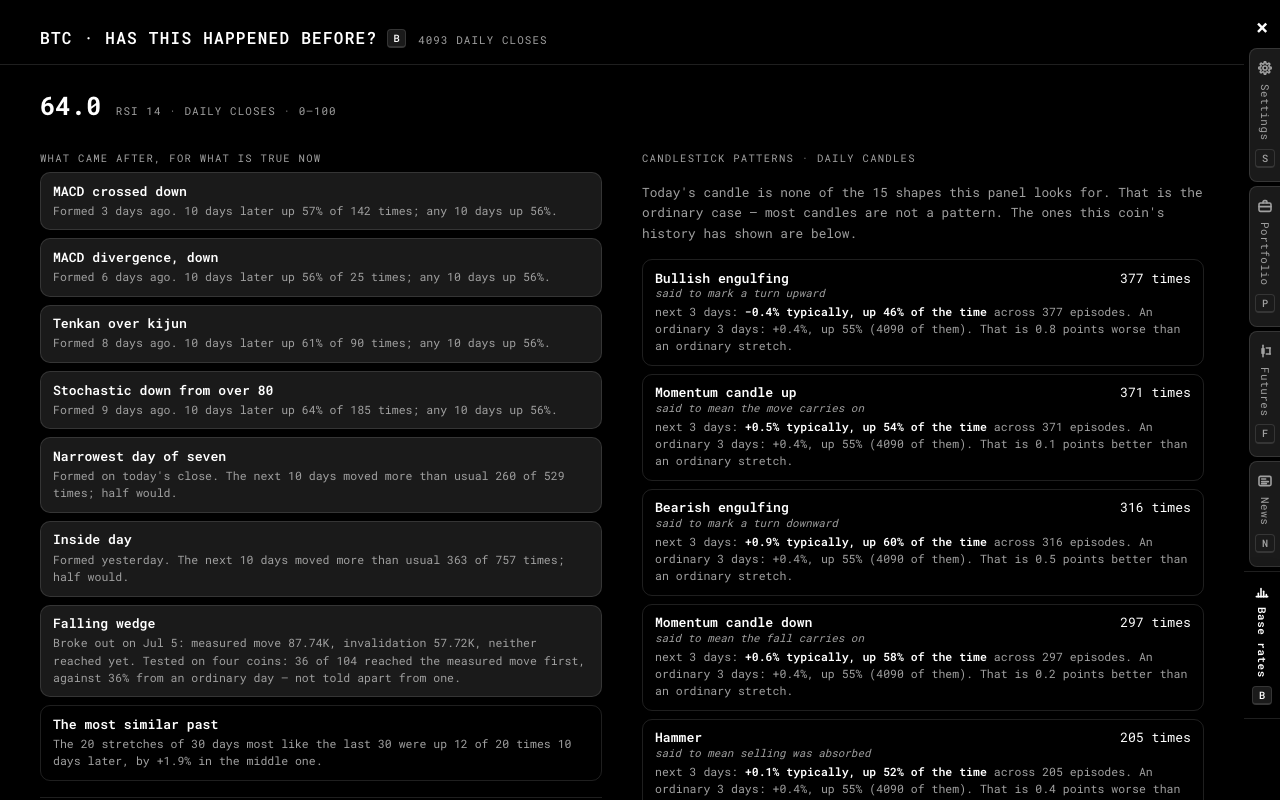
What followed every past time this coin entered the state it is in now — with the count behind every figure, and no comparison at all below twelve episodes. It opens on what came after everything true right now, and lists the twenty past stretches most like the last month with what followed each. What got built instead of buy and sell signals.
This stateAny day
19 widgets, arranged like a phone's
13
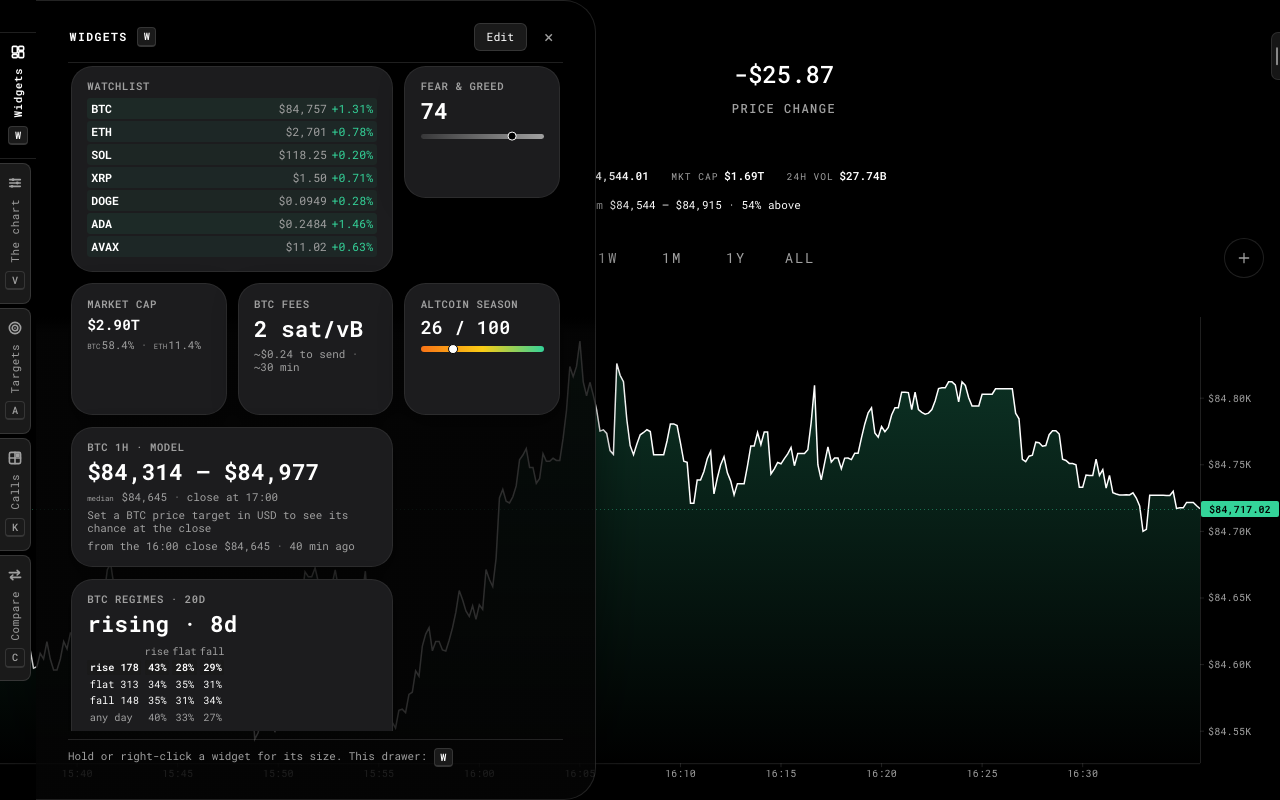
Fear & Greed, market overview, halving, difficulty, fees, gas, RSI, funding, open interest, liquidations, long/short, alt season, regimes, watchlist, top movers and more. Add them from a gallery at small, medium or large — a bigger card shows more — hold one for its size, and pin up to four to the home screen, where they rest as outlines.
Yours to arrange
14
81 coins, 37 currencies, 13 languages, dark / light / auto, blue and orange for colour-blind eyes, four modes, and a keyboard shortcut for everything — its letter on every tab, or hidden if you prefer. Press ? to see them.
/CKPF?
The next hour, by a model
15
A widget that gives Bitcoin's next hourly close as a band and a median, and a price target's chance of closing above it — from a volatility model fitted on years of hourly closes and tested on the twenty-one months it never saw, where 77.8% of hours closed inside its 80% band. It says that, and keeps its own score on your device.
❯
See it in action
02 / 05
The board: squares of real price and real time ahead, each with its chance. Click one twice to call it; it settles itself against the price at that moment.Zoomed into a day: a level, a trend line and a note drawn on it, and the whole range drawn small to show where you are.Counted studies: where the volume traded, the range the price usually covers from here, and the levels it has turned at — each with its count.Bitcoin against the S&P 500 over a month on one axis, measured from the same moment — with the gap, how often they stepped the same way and how closely.Widgets at three sizes on one grid, added from a gallery and sized from the menu a long press opens.Pinned to the home screen: outlines over the chart until you point at one.The chart companion names what it finds, where it found it — and how often it played out on this coin before.Holdings with what you paid, what they are worth, and what you have already taken off the table.The tax guide: every country, what is taxed and what is not, each rule read from an official source.The practice terminal: the perpetual's own candles, its live book and a ticket — in units that have no value.The news, dated and narrowed to your coins, with how each headline is worded and every source's age.A story read beside the list, without its pictures, under a reading of it — counted from its own words.“Has this happened before?” It opens on what came after everything true right now — each figure with the count behind it, against an ordinary stretch.Targets with how far each one has to go, and the level drawn on the chart.
❯
Private by design
03 / 05
0Permissions at install
0Accounts
0Trackers
PriceTab asks for no browser permission at install. No
account, no analytics, no telemetry. Your coins, settings, portfolio,
targets and practice account live in your browser's local storage and
never leave the device — which is also why they don't follow you to
another computer, unless you carry a backup file there yourself.
Prices come from public, keyless market APIs. The one thing that
leaves the browser beyond a request for market data is a wallet
address, and only if you paste one in to watch its balance — then it
goes to that chain's balance provider and nowhere else. Checking it
against the sanctions list happens on your device, from a list that
ships with the extension. Two things are optional and off until you
press a button inside the app: a Chrome notification for a hit
target, and eight newsroom feeds.
It also means a target can only be checked while a PriceTab tab is
open. Nothing runs in the background when your browser is closed:
there is no background worker to run it.
No remote codeOpen sourceLocal storage onlyNo background page
❯
Verify it yourself
04 / 05
A browser extension can read every page you open, so being
suspicious of one is the correct instinct — including of this page,
which is marketing. Below is the part that isn't: the manifest
Chrome enforces, every host the code can reach, and three checks
that take a minute each.
manifest.json — every key, long values shortened at …
{"manifest_version": 3,
"name": "PriceTab - Crypto Charts on Every New Tab",
"version": "1.5.0",
"default_locale": "en",
"description": "Every new tab opens a live crypto chart…",
"chrome_url_overrides": { "newtab": "index.html" },
"permissions": [],
"optional_permissions": ["notifications"],
"optional_host_permissions": ["https://cointelegraph.com/*", … eight newsroom feeds],
"action": { "default_popup": "popup.html" },
"icons": { "16": …, "48": …, "128": … }
}// Eleven keys. "permissions" is empty, and the two optional lists// are granted only when you press a button inside the app. There is no// "host_permissions", no "background" and no "content_scripts".
Nothing to grant at install
The permissions list is empty, so Chrome has nothing to ask you
about when you add it. The two optional entries are asked for
only when you press their button inside the app. That isn't a
policy we promise to keep — it is the manifest, and the browser
enforces it.
No content scripts
It cannot read, change or even see the pages you visit. The
extension exists on its own new tab and nowhere else.
Nothing runs in the background
There is no service worker to run. Close the tab and the
extension is not executing — which is also why a price target
can only be checked when you open a tab.
Every network request is in two filessrc/api.js and src/widgets-data.js.
(A third, src/i18n.js, reads a language file from
inside the extension itself.) The source contains no
XMLHttpRequest, no
sendBeacon, no eval, no
document.cookie, and no analytics SDK of any kind.
Requests go out, nothing about you goes with them
There is no account, no device id and no telemetry endpoint. A
price request contains a coin symbol and a currency code.
Every host the code can reach
Host
What for
What is sent
www.coinbase.com
Prices and chart history; exchange rates for non-USD
Coin symbol, currency code
api.exchange.coinbase.com
Candles for the crosshair and candlestick chart, and the daily history the base rates and the chart companion count
Trading pair, granularity, a time range
api.kraken.com
Coins Coinbase doesn't list (Monero among them), long-range candles, a fallback while Coinbase is not answering, and the S&P 500 and Nasdaq 100 for a comparison, as Kraken's tokenized ETFs
Trading pair, interval
api.coinlore.com
One bulk snapshot feeding the ticker, watchlist, top movers and price-only coins; the market overview
Nothing — a fixed top-100 request
api.alternative.me
Fear & Greed index
Nothing
www.okx.com
Funding rate, open interest, liquidations; the perpetual's price, candles and order book while the practice page is open
Coin symbol
api.bybit.com
Long/short ratio; the practice page's market readings; delisting and network-upgrade notices if you switch them on
Coin symbol
mempool.space
Halving, fee, mempool and difficulty cards; Bitcoin address balance
Only an address you paste in yourself
api.blockchair.com
The “what happened here?” news archive; ETH/LTC/DOGE/BCH/ZEC address balance; the four Bitcoin network cards when mempool.space cannot be reached
A date range; only an address you paste in yourself
ethereum-rpc.publicnode.com
ETH gas; ERC-20 token balances
Nothing for gas; only an address you paste in yourself
Eight optional newsrooms — never contacted until you grant them from the news panel; once granted, a story's text when you open it in the preview
Nothing — a request for a public feed
Check the permissions
Open chrome://extensions, find PriceTab, click
Details. The permissions list is empty, and there is no "service
worker" link because there is no background page.
Watch the traffic
Open a new tab, press F12, choose Network and reload.
Every row will be one of the hosts above. With the widgets off,
a first tab asks Coinbase for the price and the history of all
six ranges — seven requests, so switching ranges is instant
— and the next tab usually asks for nothing, because
everything it needs is cached.
Read the code
It ships unminified and unbundled, so what you install is what is
on GitHub. grep -rln "fetch(" src/ returns three
files: the two above, and the language loader, which only reads
from the extension's own folder.
❯
Up and running in seconds
05 / 05
1
Click "Add to Chrome" — no sign-up, nothing to configure.
2
Open a new tab. Your live chart is already there.
3
Click the price to switch coins, or open settings to make it yours.